Saturday, October 24, 2020

Firmware Password Lock Remover Unlocker Device EFI BIOS Master
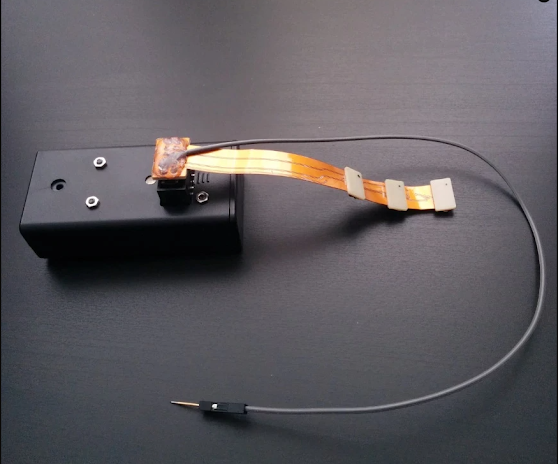
Firmware Password Lock Remover Unlocker Device EFI BIOS Master

• This device removes and unlocks the Apple Mac (2010 – 2017) EFI BIOS passwords in around 10 – 15 seconds (new version). • The purpose of this device is to help people who doesn’t have soldering skills, wants to unlock their device without dismantling the logic board or soldering the EFI BIOS chip. • It supports all type of Macs including MacBook Pro, MacBook Air, iMac, Mac mini, MacBook and Mac Pro. • There are no license restrictions or limits so this can be used as many times as you need • The process is as simple as connecting the flex cable to the connector or SOIC8 clip to the EFI chip and turn on the unlocker device and everything is done automatically. • The conventional password removing technique by soldering is difficult and time consuming even for the experts, but with this device, it’s easy, quick and hassle free. • The device works with 2x AA batteries and it comes with the SOIC8 clip and the flexible SPI cable with three connectors which supports 2010 – 2017 models • There are no needs for checking the power state such as connecting the magsafe adapter and / or the internal battery to start the unlocking • There are no messing with the confusing GPIO cable or wrong pin connection, just plug and play.

Wednesday, May 6, 2020

Remote Unlock Service Unlock MacBook PRO Air IMac EFI iCloud Passcode Apple EFI Firmware Password - USB Flash Drive

  • Service update: This service is currently not available, please use the no solder chip option https://rebrand.ly/efiunlocker


    • No need to open Mac Book
    • Do not tamper with apple warranty
    • Forgotten password ?
    • locked out after Hard Drive failed ?
    • Easier way to Unlock
    • No need to send your computer away in post
    • No need to visit a repair shop
    • No need to book a appointment in a Apple shop
    • This way of unlocking is the same way an Apple technician would do in the apple shops
    • Easy way to do but need to have access to another MAC to prepare the USB Stick for few minutes with file we email you.

    What is required ? We need the Serial number and HASH code from your Mac book.

    You need to send us picture of good quality of the numbers using the order page as any mistake in number entry will waste your money as service is not refundable and costs is not cheap so need to remove all chances or wrong data entry.

    You need to have a USB Memory Stick and access to a MAC Book pc to prepare the unlock USB stick Serial number is printed under your mac book

    To Find HASH code follow the instruction

    Once we received your HASH code and serial number,

    we can usually can send you the unlock SCBO file pre loaded on usb within 1 to 3 working days via the shipping method you select at order time or we can email your the file so you can prepare your own usb stick that will then unlock the mac efi password.and opt ot have it emailed to you in the order page.

    What is required ?
    We need the serial number and HASH code from your mac book.
    You need to have a USB Memory Stick and access to a MAC Book pc to prepare the unlock USB stick


    Serial number is printed under your mac book
    HASH code follow the instruction


    After unlock the mac book will need to be reset.


    Locate the following keys on the keyboard: Command , Option, P, and R. You will need to hold these keys down simultaneously.
    Turn on the computer.
    Press and hold the Command-Option-P-R keys before the grey screen appears.
    Hold the keys down until the computer restarts and you hear the startup sound for the second time.
    Release the keys.

    Once we received your HASH code and serial number, we can usually can send you the unlock file within 1 to 3 days.

    Instruction after received the SCBO file via email if you chose that method in the order page otherwise if you selected to receive a usb drive with all files then ignore the steps below as we do that all for you before we ship your usb unlock stick for you apple computer.

    • You will need any mac computer and a USB memory stick ( 512mb, 1gb 2gb are good)
    • Please perform the following steps in exactly this order. If they don't work, start over from the beginning and make sure you follow each one exactly. If that still doesn't work, contact us via Chat.

    1) Format a flash drive GUID partition scheme and Mac OS Extended format. Name it Firmware
    2) Drag the attached SCBO file to your Desktop.
    3) Open Terminal.
    4) Paste the following command into the terminal window and press enter:
    cp ~/Desktop/SCBO /Volumes/Firmware/.SCBO

    You should get a new line, no errors.

    5) Paste the following command into the terminal window and press enter:
    cp ~/Desktop/SCBO /Volumes/Firmware/._SCBO

    You should get a new line, no errors.

    6) Eject the flash drive.
    7) Turn off the Mac book you want to unlock the EFI/iCloud Passwords.
    8) Insert the flash drive that we sent you or the one you prepared yourself with the file we emailed you.
    9) Turn on the computer and immediately hold down the Option key.
    You should see the lock symbol for a second and then it will restart to the Startup Manager.


    After unlock please reset the NVRAM:

    How to reset NVRAM after unlock.

    Locate the following keys on the keyboard: Command , Option, P, and R. You will need to hold these keys down simultaneously.
    Turn on the computer.
    Press and hold the Command-Option-P-R keys before the grey screen appears.
    Hold the keys down until the computer restarts and you hear the start up sound for the second time.
    Release the keys.

    Now you can use wifi recovery to install the OS or use the OSX recovery Disk

    Before you install new Operating System, you need to wipe everything from the hard disk or else it could get icloud locked again.

    Two way to fully format the hard disk.
    1) Remove the hard drive to do the format on another computer.
    2) Start your mac from a bootdisk DVD or USB ( Why ? because Mac will not let you format the disk you are current using to startup )

    Some of the Supported devices include: but we can do any apple computer

    Thursday, December 12, 2019

    Updated EFI Chip Free Removal Unlock Tool


    There are two types of lock on MacBook, PIN and EFI firmware lock. If you have trouble in unlocking PIN and EFI firmware lock of MacBook, our updated unlocking tool would be helpful. Before it, How To Unlock MacBook By Removing EFI Password has introduced in our previous blog. It is worth to take a look, and you will get something from that. Today, we bring an updated EFI remove unlock tool, this tool can be used to modify serial number, recompose data of the ME module and clear PIN lock. Let’s check how it works?
    Application:
    MacBook Pro 2010-2017
    MacBook Air 2010-2017
    MacBook 2015-2017
    iMac 2010-2016
    MAC mini 2010-2016
    Get an EFI locked MacBook. Hold ‘Power Button+Option Key’ to turn on the MacBook. The MacBook requires EFI password to login.
    Insert the USB flash drive storing system bootstrap into the USB slot. There is still no response.
    First, check the model and serial number of MacBook. Remove the lower case. And disconnect the battery. Locate the SAM Socket on the logic board.
    Connect the programmer with computer. Install the unlock software. Connect the corresponding SAM Socket FPC with the programmer. Then connect Pin 1 of the FPC with Pin 1 of the SAM Socket.
    Tips: the MacBook should be turned off during the data reading process. Otherwise, the data reading process will fail.
    Get the MacBook power supplied with an external power source. Hold the power button to turn off the MacBook. Click ‘Smart Identify SmartID’ on the interface of the unlock software. The model of the EFI chip will be recognized automatically. Click ‘Read ’ to read EFI chip data. Click ‘Save’ to save the EFI data. Once done, erase the EFI password. Then, locate the password removed file on the computer. Click ‘Write’ to write the free password EFI data to the EFI chip.
    Tips: only the original EFI data works with the clearance of data password.
    Once done, detach the unlock tool. Connect the battery. There is no firmware lock on the interface. Turn off the MacBook. Insert the USB flash drive storing system bootstrap into the USB slot. The USB flash drive can be recognized. The MacBook has been unlocked successfully.
    Tips: All data remain the same after unlocking, no need for OS reinstallation.
    remain 

    Mac efi unlock,efi unlockmac efi bios unlockefi unlock toolmacbook efi unlockefi unlock macbook promacbook pro efi unlockefi password unlockefi pin unlockefi unlock macbookunlock efiunlock efi macbookefi firmware password unlockefi password reset remove unlock toolunlock efi macbook air

    Saturday, May 2, 2015

    mac efi unlock free

    mac efi unlock free ?
    Yes it was free back in 2010 when all the macs where made before 2009.
    And the reset efi, you just had to remove one of your Rams.
    Everything changed after apple started upgrading their efi chips.

    Mac Efi Unlock Free Solution

    Unlocking your EFI locked Mac can be a nightmare, but most people ignore that Apple can unlock their mac if it belongs to them.
    Yes, you need to prove that you own the computer to have it unlocked by Apple. To prove to Apple to that you own the device, you will need to provide the original purchase invoice, even if your neme is not on the invoice.

    That is why you should always insist on getting the original invoice when buying a used mac. If the seller do not have it, then your guess is as good as mine and you should not buy it.

    If you do insist on buying it, then spend as little money as possible on it. Usually when you see a password on a mac, there is a huge chance that the icloud is on and icould mean efi lock.


    Now you have 3 choices, buy a new logic board, have the Amtel ship flashed, or have it remotely unlock by signed binary.


    reset bios mac macbook pro bios reset


    Reset Open Firmware Password

    How do I reset the firmware password on my MacBook Pro ?

    Power on the Mac and immediately press and hold command-option-P-R. found the firmware password should be remove or reset, so I found www.macefiunlock.com
    They unlocked the mac in one hour after I made the payment.


    mac bios unlock

    mac bios unlock with www.macefiunlock.com is not free but they get the job done fast and the best part is that you don't have to send them your mac.

    Try them out and ask for discount mention us

    Mac efi unlock,
    efi unlock
    mac efi bios unlock
    efi unlock tool
    macbook efi unlock
    efi unlock macbook pro
    macbook pro efi unlock
    efi password unlock
    efi pin unlock
    efi unlock macbook
    unlock efi
    unlock efi macbook
    efi firmware password unlock
    efi password reset remove unlock tool
    unlock efi macbook air

    Tuesday, March 18, 2014

    Monday, March 10, 2014

    How to get the 33-digit hash of your mac

    1. Boot with Option key held to display the boot menu's firmware password prompt.
    2. Press Control-Option-Command-Shift-S to reveal a 33-digit hash (mixed letters and numbers) that contains an identifier for your specific motherboard and the Atmel chip used for your system. In this hash, the first 17 digits are an identifier for the system's motherboard, and the last 16 digits are a hash for the password.
    This Number is used to compile a signed binary unique to each apple computers.

    Monday, February 10, 2014

    Mac bios password reset DIY

    Learn what to do if you no longer remember the firmware password that you’ve set or if you see a password dialog when you try to select a startup volume on a MacBook Air (Late 2010) and later, MacBook Pro (Early 2011) and later, iMac (Mid 2011) and later, or Mac mini (Mid 2011) computer.
    Only Apple retail stores or Apple Authorized Service Providers can unlock these computers protected by a firmware password.
    If you cannot remember the firmware password for your Mac, schedule a service appointment with either an Apple Retail Store or an Apple Authorized Service Provider. If you plan to visit an Apple Retail store, please make a reservation at the Genius Bar using http://www.apple.com/retail/geniusbar/ (available in some countries only).


    Mac efi unlock,
    efi unlock
    mac efi bios unlock
    efi unlock tool
    macbook efi unlock
    efi unlock macbook pro
    macbook pro efi unlock
    efi password unlock
    efi pin unlock
    efi unlock macbook
    unlock efi
    unlock efi macbook
    efi firmware password unlock
    efi password reset remove unlock tool
    unlock efi macbook air


    http://macefiunlock.com

    Bios recovery for motherboard

    Hello guys, i was asked to try another way to bypass efi, by doing what i call advanced soldering, i and i thought i will share with you. This is clearly not for newbs, but you can find people to help you solder it in for you locally.
    So to the point, the solution is sold by a guy on ebay, check it out here http://stores.ebay.com/Bios-Chip-Store
    Contact the guy and give him the model of your computer, so he can give you the right item for your machine.

    it's
    The pre-programmed EFI Firmware chip can be used to unlock the EFI password (firmware password)


    i did not try this, but it could be a cheaper alternative for those of you who think my tool is expensive.
    As remonder, my tool envoles not soldering, you only plug in my tool in one of the connector that i will show you to do the magic.


    comments please


    Monday, June 24, 2013

    Mac EFI Password Reset PDF

    Mac EFI Password Reset PDF that will guide bypass that EFI password, but it only works for macbook pro 2008 up till 2011.

    please email me and i will send you this PDF Guide


    Breve History on efi
    Originally, the hardware architecture was so closely tied to the Mac OS operating system that it was impossible to boot an alternative operating system. The most common workaround, used even by Apple for A/UX, was to boot into Mac OS and then to hand over control to a program that took over the system and acted as a bootloader. This technique was no longer necessary with the introduction of Open Firmware-based PCI Macs, though it was formerly used for convenience on many Old World ROM systems due to bugs in the firmware implementation.[citation needed] Now, Mac hardware boots directly from Open Firmware (most PowerPC-based Macs) or EFI (all Intel-based Macs), and Macs are no longer limited to running just Mac OS X.  read more here

    Mac efi unlock,
    efi unlock
    mac efi bios unlock
    efi unlock tool
    macbook efi unlock
    efi unlock macbook pro
    macbook pro efi unlock
    efi password unlock
    efi pin unlock
    efi unlock macbook
    unlock efi
    unlock efi macbook
    efi firmware password unlock
    efi password reset remove unlock tool
    unlock efi macbook air

    Saturday, May 18, 2013

    Bypass Mac Firmware Password


    Bypass Mac Firmware Password


    COMMAND+OPTION+P+R is blocked from OpenFirmwarePassword


    So let us do it for you


    email us at macefiunlock@gmail.com for pricing 


    Mac efi unlock,
    efi unlock
    mac efi bios unlock
    efi unlock tool
    macbook efi unlock
    efi unlock macbook pro
    macbook pro efi unlock
    efi password unlock
    efi pin unlock
    efi unlock macbook
    unlock efi
    unlock efi macbook
    efi firmware password unlock
    efi password reset remove unlock tool
    unlock efi macbook air


    how to reset password on macbook air

    Let us do it for you


    Macbook bios password reset

    reset macbook password without cd

    reset macbook password without password

    how to reset macbook password if forgotten

    reset macbook pro password

    how to reset password on macbook air

    forgot macbook password

    reset apple password

    reset ibook password

    How to Reset your Mac EFI Password

    If you forgot the EFI password on your iMac, Macbook Pro or Macbook Air.
    I can restore it to factory default which has no password on it. so you can boot from external drive to reload the OS


    www.macefiunlock.com

    The model number below are available for this service
    1. iMac 21" A1311
    2. iMac 27"
    3. Macbook Pro 17" A1297
    4. Macbook Pro 15" A1286
    5. Macbook Pro 13" A1278
    6. Macbook Air 11" A1370, A1465
    7. Macbook Air 13" A1369, A1466
    8. Macbook Pro 15" A1398 with Retina display
    9. MacBook Pro 13" A1425 with retina display
    10. All Mac Mini
    This service is not free, 
    our service 100% safe and you will have your mac Running in No time

    Once we tell you we have the code for your MAC computer, we will then send you a request for payment via paypal.
    Once we receive your payment we will then send you the Code or the steps depending on the model within 5 business days ( Weekend EXCLUDED)
    If you connot wait, please do not order our service.

    If you buy our service maliciously and come back later for refund, Be warned We can re-lock your computer and set a note next to the serial number so that you will never get it unlocked again. Trust